


Prompt Burnout Is the New AI Fatigue
AI at work. Published November 12, 2026. Updated November 12, 2026.

You bought the AI subscriptions. Then came the videos. You spent a Saturday building the perfect prompt for your sales follow-up emails. By Tuesday it was turning out something you would never send a customer, so you rewrote it. Then you tried a different engine. Then a third.
People call this AI fatigue or AI burnout. We call it prompt burnout, because the prompting is what wears you down.
It is eating the hours that owners used to spend on sales, operations and people. And for most companies, it is going to get worse over the next few years before it gets better.
What does prompt burnout look like?
Prompt burnout is the drain that comes from managing AI tools yourself. It's prompting fatigue that never gets a day off. You write a prompt. You read the output and correct it. Then you explain what you meant and ask again. Then you double check the next answer, because the last one had an invented number in it.
The hours are only part of the cost. The bigger cost is attention. Every hour in a chat window is an hour away from the business. That could be a sales call, a hire or a customer about to leave.
You will know it is happening when:
- You have three or four AI tools open and none of them run on their own
- You re-explain your business to a chatbot every week
- Your team waits on you because you are "still setting up the AI"
- Revenue work keeps sliding to next week
Is AI burnout real?
Owners are not imagining this. In mid-2024, the Upwork Research Institute surveyed 2,500 people in four countries, including 1,250 C-suite leaders. 96% of the executives expected AI to raise productivity. Yet 77% of employees using AI said it had added to their workload. 39% said they now spend more time reviewing or moderating AI-generated content.
Other research points the same way. Workers who lean hardest on AI often report the most strain, because the time it saves gets filled with checking, fixing and coordinating its output.
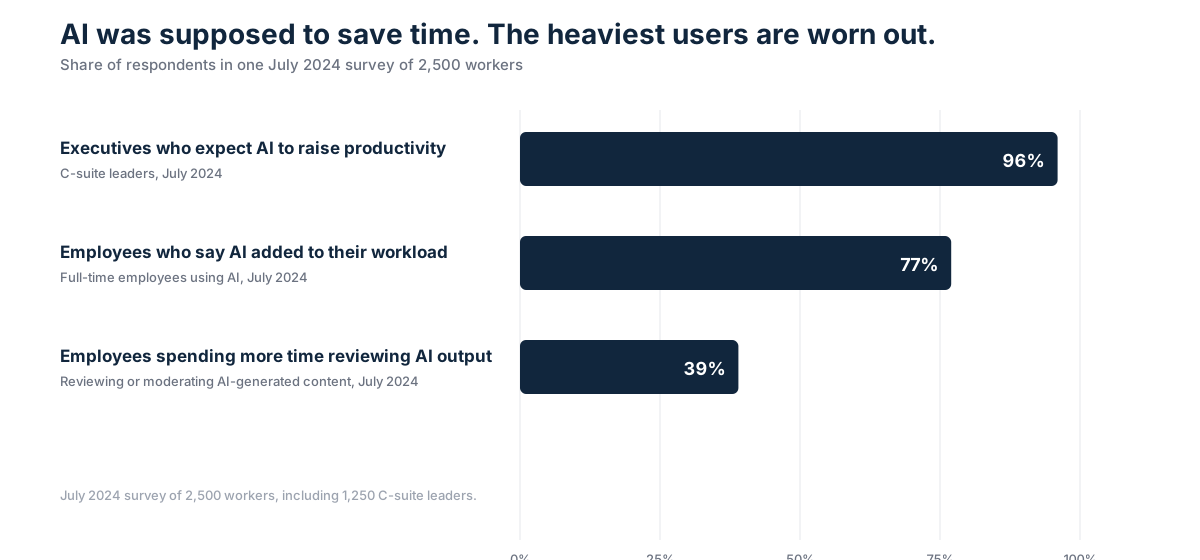
That is AI burnout in plain numbers. The people getting the most out of AI are the most worn down. Those are full-time employees managing their own tasks. Now picture the owner who manages everything.
Why does prompting feel like managing an employee?
An AI engine works a lot like a fast, eager new hire. The catch is that it forgets what you told it yesterday.
You give it instructions. It does the work. You review it. There are mistakes to find. So you explain again and follow up. Then you follow up on the follow-up.
Every owner knows how that goes with people. An employee who needs constant follow-up costs more than a paycheck. They cost you focus. AI tools work the same way. And in most small and mid-size companies, nobody else on the team knows how to run them. So the job lands back on the owner.
The owner becomes the prompt writer, the editor, the quality checker and the IT department. Nobody hired them for that role. It pays nothing, and it never shows up on a P&L.
Will AI fatigue get better on its own?
AI will keep getting better. At some point it may get close to thinking for you. That day is not here yet, and the road to it will be crowded.
Over the next few years, expect more engines to deal with. You may have one for writing, another for images and a third inside your CRM. Then come agents that book appointments and answer the phone. Each one has its own quirks and its own way of being asked. Each one changes when the vendor pushes an update. A prompt that worked in March can break in June.
Someone has to keep up with all of it. Someone has to test the new model, rewrite the instructions and make sure the output still sounds like your company. That work never stops once the setup is done. It is a standing job, and right now most owners are doing it on nights and weekends.
A lot of owners try to automate their way out. They connect one tool to another and hope it runs on its own. It helps for a while. But every automation is one more thing to prompt, watch and fix when it breaks.
And more automation is on the way. Each new layer adds to the AI fatigue unless someone is managing it for you.
Where should an owner's hours go?
Look at the work only an owner can do well.
Operations. Making sure jobs get done on time and on budget.
Revenue. Closing deals, setting prices and opening new markets.
People. Training staff, coaching managers and hiring the next key role.
Customers. Hearing what they need before a competitor does.
None of that happens in a chat window. Every cycle you spend rewording a prompt comes out of one of those four buckets. Over a quarter, it adds up. Over a year, it can be the difference between growing and standing still.
Owners should focus on people and process. The tools are a means to that end. Someone needs to run them, but it does not have to be you.
How does a strategic partner fix prompt burnout?

A business partner who already knows prompt engineering can carry this for you.
A strategic partner takes the AI work off your plate. They learn your business once. They pick the right tools, then build the prompts, automations and agents. They test them, fix them and keep them current as the engines change. You get the results without the constant follow-up.
That is how eSolve works. We are strategic operators. Marketing, sales and technology are our core, and we look at the whole business, from brand to operations. We put the tools to work so you can guide the company. Our team handles:
- Choosing and setting up the AI tools that fit your business
- Writing and maintaining the prompts and workflows behind them
- Building automations for marketing, lead follow-up and back office tasks
- Watching for model updates and fixing what breaks
Then we meet with you to show what was built, what it produced and what comes next. You set the direction. You focus on your people and your process. We do the prompting. Our AI enablement services page explains how that work runs.
What changes when you stop prompting?
Owners who hand this off tend to notice the same things first. Their calendar opens up. Their team stops waiting on them. Decisions get made faster because the owner is back in the business instead of buried in tool settings.
The AI still runs. It just runs without pulling you away from sales, operations and the people who drive your revenue. A tool is supposed to give you time back. If it is taking time away, the setup is wrong.
Is it time to get help?
Ask yourself a few honest questions:
- Did you spend more than two hours this week inside AI tools?
- Has an AI project stalled because you did not have time to finish it?
- Are you paying for tools nobody on your team uses well?
- Did a sales call or hiring task slip because you were "fixing the AI"?
If you answered yes to two or more, prompt burnout is already costing you money. Put the right partner on the job and get back to running your company.
A simple test for whether prompting is costing you
Track one normal week. Every time you open an AI tool for work, write down the task and the minutes you spent. Include the time spent fixing the output.
At the end of the week, sort the list into two columns. One column is work only you can do, like pricing or a hard customer call. The other is work someone else could do with the right setup.
If the second column holds more than a few hours, you have prompt burnout. Those hours belong to a system. A good partner can take that column, build it once and keep it running.
What to hand off first
Start with the tasks you repeat every week. Review replies, quote follow-ups and social posts are common examples. Each one follows a pattern, so a good setup handles it once and keeps going. Keep the judgment calls for yourself, like pricing, hiring and your biggest customers.
Write down the hours you got back each week. That number makes the case for the next task to hand off.
Get your hours back
eSolve builds and runs the AI side of your business so you can run the rest. We start with a free assessment. It shows where AI can save you time, which tools fit your team and what to hand off first. From there we build it, manage it and keep checking in with you.
You started your company to serve customers and grow revenue. Let us carry the prompting so you can get back to that work. More owner guides live in our insights.
Common questions
What is prompt burnout?
Prompt burnout is the fatigue that comes from writing, fixing and rerunning AI prompts yourself. It is a form of AI fatigue. It hits owners hardest because they often end up running every AI tool in the company.
Is prompt burnout the same as AI fatigue?
They overlap. AI fatigue is the broad term for feeling worn down by AI tools. Prompt burnout names the part that drains owners most: the constant prompting, checking and follow-up.
Will better AI fix prompt burnout?
Not soon. More engines and agents are coming, and each one needs setup, testing and upkeep. The workload grows before it shrinks.
How do I stop prompt burnout?
Hand the AI work to someone whose job is to run it. A strategic partner can pick the tools, build the prompts and keep them working. You stay focused on people, process and revenue.
How do I know if I have prompt burnout?
You have it if AI tools take more of your week than they save. Watch for re-explaining your business to a chatbot, fixing the same mistakes and juggling several tools. Track your time for a week to be sure.
Can a small business avoid prompt burnout without hiring anyone?
Yes, partly. Save prompts that work, keep a short document about your business to paste in and pick one tool per task. That cuts the repeat work. The bigger fix is handing the setup to someone who builds it once.